> ## Documentation Index
> Fetch the complete documentation index at: https://docs.payreque.st/llms.txt
> Use this file to discover all available pages before exploring further.
# Business Insights Dashboard
> Monitor your business performance with comprehensive analytics and real-time metrics
# Business Insights Dashboard 📊
The Business Insights dashboard is your command center for understanding your business performance. Get a comprehensive overview of your revenue trends, customer growth, subscription metrics, and recent activities - all in one beautifully designed interface.
## What You'll Find on Your Insights Dashboard
### 📈 Monthly Revenue Comparison
Track your business growth with side-by-side revenue comparisons:
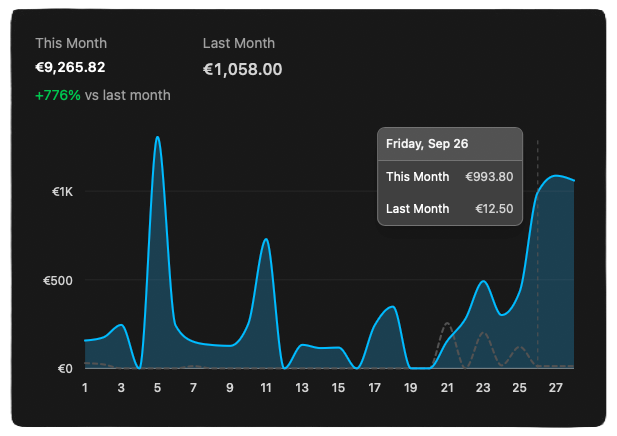 * **Current Month vs. Last Month**: See exactly how your revenue is trending
* **Percentage Growth**: Quick visual indicators show if you're growing or need attention
* **Interactive Charts**: Hover over any point to see detailed daily breakdowns
* **Smart Date Ranges**: Automatically compares equivalent time periods for accurate insights
The monthly comparison chart uses your actual transaction data, so you'll see real-time updates as payments are processed throughout the month.
### 💰 Key Performance Metrics
Get instant insights into your most important business metrics:
#### Monthly Recurring Revenue (MRR)
* **Current MRR**: Your predictable monthly revenue from active subscriptions
* **Growth Trend**: See if your MRR is increasing or decreasing month-over-month
* **Sparkline Chart**: Quick visual representation of your MRR trend over the past 12 months
#### Financial Health Indicators
* **Mollie Balance**: See your available payment processor balance (when connected)
* **Bank Balance**: Monitor your connected bank accounts through Ponto integration
* **Transfer Schedule**: Know when to expect fund transfers
#### Business Growth Metrics
* **Active Subscriptions**: Track your growing subscriber base
* **New Customers**: Monitor customer acquisition this month
* **Payment Volume**: See how many payments you're processing
All metrics update automatically as new transactions are processed, giving you the most current view of your business.
Check your insights on any device - the dashboard adapts perfectly to mobile and tablet screens.
### 🕒 Recent Activity Log
Stay informed about what's happening in your business with the comprehensive activity log:
#### What You'll See
* **Recent Actions**: Create, update, delete operations on customers, products, subscriptions
* **Payment Activities**: Successful payments, failed payments, refunds
* **Email Communications**: Invoice emails sent, payment confirmations, reminders
* **System Events**: Subscription renewals, trial expirations, mandate updates
#### Activity Display Options
* **10 or 25 entries**: Choose how many recent activities to display
* **Smart Icons**: Color-coded icons instantly tell you what type of activity occurred
* **Time Stamps**: See exactly when each activity happened (e.g., "2 uur geleden")
* **Entity Details**: Click through to see the specific customer, invoice, or subscription involved
#### Activity Types & Icons
* 🟢 **Create Actions**: New customers, products, or subscriptions (green plus icon)
* 🔵 **Updates**: Changes to existing records (blue pencil icon)
* 🔴 **Deletions**: Removed items (red trash icon)
* 💳 **Payments**: Successful payments and transactions (green credit card icon)
* 📧 **Emails**: Communications sent to customers (purple envelope icon)
### 📋 Recent Business Activities
Quick overviews of your latest business activities across different areas:
#### Recent Invoices
* **Latest 5 invoices**: See your most recent billing activity
* **Payment Status**: Quickly identify paid, pending, and unpaid invoices
* **Customer Names**: Know who you're billing and when
* **Amount Tracking**: Monitor invoice values at a glance
#### Recent Subscriptions
* **New Subscriptions**: See customers who recently signed up
* **Status Overview**: Active, trial, paused, or canceled subscriptions
* **Product Information**: Which plans are customers choosing
* **Growth Patterns**: Identify your most popular subscription offerings
#### Recent Orders
* **Shop Activity**: Track one-time purchases through your shop
* **Order Values**: See the revenue from each order
* **Customer Orders**: Monitor repeat purchase behavior
* **Order Status**: Completed, processing, or pending orders
### 🔄 Upcoming Subscription Renewals
Never miss a renewal with the upcoming renewals tracker:
#### Renewal Overview
* **Next 30 Days**: See all subscriptions renewing in the coming month
* **Priority Indicators**: Color-coded badges show urgency (red for today/tomorrow, amber for this week)
* **Revenue Forecast**: Understand upcoming cash flow from renewals
* **Customer Details**: Know which customers are renewing when
#### Renewal Management
* **Days Until Renewal**: Clear countdown for each subscription
* **Amount Information**: See the exact renewal amount for each subscription
* **Customer Context**: Customer name and subscription details
* **Quick Actions**: Jump directly to subscription management if needed
Pay special attention to subscriptions showing in red (today/tomorrow) or amber (this week) - these may need your attention if there are payment issues.
## Making the Most of Your Insights
### Daily Business Check-ins
Start each day by reviewing:
1. **Yesterday's Activity**: Check the activity log for any important overnight events
2. **Today's Renewals**: Look for any subscriptions renewing today
3. **Recent Payments**: Ensure payment processing is running smoothly
4. **New Customers**: Welcome any new sign-ups
### Weekly Business Reviews
Once a week, dive deeper into:
1. **Monthly Trends**: Are you on track to meet your revenue goals?
2. **Customer Growth**: How many new customers did you acquire?
3. **Subscription Health**: Any concerning cancellation patterns?
4. **Payment Issues**: Any failed payments that need attention?
### Monthly Planning
Use month-end insights for:
1. **Growth Analysis**: Compare this month to last month's performance
2. **Revenue Forecasting**: Use renewal data to predict next month's revenue
3. **Customer Retention**: Analyze subscription lifecycle patterns
4. **Business Optimization**: Identify areas for improvement
## Understanding Your Data
### Revenue Metrics
All revenue data comes from your actual payment transactions, ensuring accuracy. We track:
* **Paid Transactions**: Only completed payments count toward revenue
* **Currency Handling**: All amounts displayed in your configured currency (typically EUR)
* **Real-time Updates**: New payments appear within minutes
### Activity Tracking
The activity log captures:
* **User Actions**: Things you do in the dashboard
* **System Events**: Automated processes and scheduled tasks
* **Customer Activities**: Actions taken by your customers
* **Integration Events**: Data from connected payment providers
### Data Privacy
Your insights dashboard respects privacy:
* **User-Scoped**: You only see data for your business
* **Secure Access**: All data is encrypted and access-controlled
* **GDPR Compliant**: Customer data handling follows European privacy standards
## Troubleshooting Common Questions
Revenue data comes from completed payments through your connected payment providers. If you're not seeing data:
* Ensure your payment provider (Mollie/Stripe) is connected and active
* Check that you've processed actual payments (test payments may not appear)
* Allow up to 15 minutes for new payments to appear in insights
MRR is calculated from your active subscriptions with recurring billing. If it seems off:
* Check that your subscriptions have the correct recurring amounts
* Ensure subscription statuses are accurate (active vs. paused)
* Remember that one-time payments don't count toward MRR
If you're not seeing activities:
* Activities are only recorded for actions within PayRequest
* External payment provider activities may not appear immediately
* Try refreshing the page or adjusting the display limit (10 vs 25 entries)
Renewal dates are based on your subscription billing cycles:
* Check individual subscription "next billing date" settings
* Paused subscriptions won't show renewal dates
* Failed payment subscriptions may have delayed renewal dates
## Next Steps
Dive deeper into your revenue analytics with detailed tracking and forecasting tools.
Generate detailed reports for accounting, tax purposes, and business analysis.
Understand your customer behavior, lifetime value, and retention patterns.
Learn how to export your data for external analysis and record keeping.
***
*Your insights dashboard is designed to give you confidence in your business decisions. The more you use PayRequest, the richer your insights become!* 📊✨
* **Current Month vs. Last Month**: See exactly how your revenue is trending
* **Percentage Growth**: Quick visual indicators show if you're growing or need attention
* **Interactive Charts**: Hover over any point to see detailed daily breakdowns
* **Smart Date Ranges**: Automatically compares equivalent time periods for accurate insights
The monthly comparison chart uses your actual transaction data, so you'll see real-time updates as payments are processed throughout the month.
### 💰 Key Performance Metrics
Get instant insights into your most important business metrics:
#### Monthly Recurring Revenue (MRR)
* **Current MRR**: Your predictable monthly revenue from active subscriptions
* **Growth Trend**: See if your MRR is increasing or decreasing month-over-month
* **Sparkline Chart**: Quick visual representation of your MRR trend over the past 12 months
#### Financial Health Indicators
* **Mollie Balance**: See your available payment processor balance (when connected)
* **Bank Balance**: Monitor your connected bank accounts through Ponto integration
* **Transfer Schedule**: Know when to expect fund transfers
#### Business Growth Metrics
* **Active Subscriptions**: Track your growing subscriber base
* **New Customers**: Monitor customer acquisition this month
* **Payment Volume**: See how many payments you're processing
All metrics update automatically as new transactions are processed, giving you the most current view of your business.
Check your insights on any device - the dashboard adapts perfectly to mobile and tablet screens.
### 🕒 Recent Activity Log
Stay informed about what's happening in your business with the comprehensive activity log:
#### What You'll See
* **Recent Actions**: Create, update, delete operations on customers, products, subscriptions
* **Payment Activities**: Successful payments, failed payments, refunds
* **Email Communications**: Invoice emails sent, payment confirmations, reminders
* **System Events**: Subscription renewals, trial expirations, mandate updates
#### Activity Display Options
* **10 or 25 entries**: Choose how many recent activities to display
* **Smart Icons**: Color-coded icons instantly tell you what type of activity occurred
* **Time Stamps**: See exactly when each activity happened (e.g., "2 uur geleden")
* **Entity Details**: Click through to see the specific customer, invoice, or subscription involved
#### Activity Types & Icons
* 🟢 **Create Actions**: New customers, products, or subscriptions (green plus icon)
* 🔵 **Updates**: Changes to existing records (blue pencil icon)
* 🔴 **Deletions**: Removed items (red trash icon)
* 💳 **Payments**: Successful payments and transactions (green credit card icon)
* 📧 **Emails**: Communications sent to customers (purple envelope icon)
### 📋 Recent Business Activities
Quick overviews of your latest business activities across different areas:
#### Recent Invoices
* **Latest 5 invoices**: See your most recent billing activity
* **Payment Status**: Quickly identify paid, pending, and unpaid invoices
* **Customer Names**: Know who you're billing and when
* **Amount Tracking**: Monitor invoice values at a glance
#### Recent Subscriptions
* **New Subscriptions**: See customers who recently signed up
* **Status Overview**: Active, trial, paused, or canceled subscriptions
* **Product Information**: Which plans are customers choosing
* **Growth Patterns**: Identify your most popular subscription offerings
#### Recent Orders
* **Shop Activity**: Track one-time purchases through your shop
* **Order Values**: See the revenue from each order
* **Customer Orders**: Monitor repeat purchase behavior
* **Order Status**: Completed, processing, or pending orders
### 🔄 Upcoming Subscription Renewals
Never miss a renewal with the upcoming renewals tracker:
#### Renewal Overview
* **Next 30 Days**: See all subscriptions renewing in the coming month
* **Priority Indicators**: Color-coded badges show urgency (red for today/tomorrow, amber for this week)
* **Revenue Forecast**: Understand upcoming cash flow from renewals
* **Customer Details**: Know which customers are renewing when
#### Renewal Management
* **Days Until Renewal**: Clear countdown for each subscription
* **Amount Information**: See the exact renewal amount for each subscription
* **Customer Context**: Customer name and subscription details
* **Quick Actions**: Jump directly to subscription management if needed
Pay special attention to subscriptions showing in red (today/tomorrow) or amber (this week) - these may need your attention if there are payment issues.
## Making the Most of Your Insights
### Daily Business Check-ins
Start each day by reviewing:
1. **Yesterday's Activity**: Check the activity log for any important overnight events
2. **Today's Renewals**: Look for any subscriptions renewing today
3. **Recent Payments**: Ensure payment processing is running smoothly
4. **New Customers**: Welcome any new sign-ups
### Weekly Business Reviews
Once a week, dive deeper into:
1. **Monthly Trends**: Are you on track to meet your revenue goals?
2. **Customer Growth**: How many new customers did you acquire?
3. **Subscription Health**: Any concerning cancellation patterns?
4. **Payment Issues**: Any failed payments that need attention?
### Monthly Planning
Use month-end insights for:
1. **Growth Analysis**: Compare this month to last month's performance
2. **Revenue Forecasting**: Use renewal data to predict next month's revenue
3. **Customer Retention**: Analyze subscription lifecycle patterns
4. **Business Optimization**: Identify areas for improvement
## Understanding Your Data
### Revenue Metrics
All revenue data comes from your actual payment transactions, ensuring accuracy. We track:
* **Paid Transactions**: Only completed payments count toward revenue
* **Currency Handling**: All amounts displayed in your configured currency (typically EUR)
* **Real-time Updates**: New payments appear within minutes
### Activity Tracking
The activity log captures:
* **User Actions**: Things you do in the dashboard
* **System Events**: Automated processes and scheduled tasks
* **Customer Activities**: Actions taken by your customers
* **Integration Events**: Data from connected payment providers
### Data Privacy
Your insights dashboard respects privacy:
* **User-Scoped**: You only see data for your business
* **Secure Access**: All data is encrypted and access-controlled
* **GDPR Compliant**: Customer data handling follows European privacy standards
## Troubleshooting Common Questions
Revenue data comes from completed payments through your connected payment providers. If you're not seeing data:
* Ensure your payment provider (Mollie/Stripe) is connected and active
* Check that you've processed actual payments (test payments may not appear)
* Allow up to 15 minutes for new payments to appear in insights
MRR is calculated from your active subscriptions with recurring billing. If it seems off:
* Check that your subscriptions have the correct recurring amounts
* Ensure subscription statuses are accurate (active vs. paused)
* Remember that one-time payments don't count toward MRR
If you're not seeing activities:
* Activities are only recorded for actions within PayRequest
* External payment provider activities may not appear immediately
* Try refreshing the page or adjusting the display limit (10 vs 25 entries)
Renewal dates are based on your subscription billing cycles:
* Check individual subscription "next billing date" settings
* Paused subscriptions won't show renewal dates
* Failed payment subscriptions may have delayed renewal dates
## Next Steps
Dive deeper into your revenue analytics with detailed tracking and forecasting tools.
Generate detailed reports for accounting, tax purposes, and business analysis.
Understand your customer behavior, lifetime value, and retention patterns.
Learn how to export your data for external analysis and record keeping.
***
*Your insights dashboard is designed to give you confidence in your business decisions. The more you use PayRequest, the richer your insights become!* 📊✨